

For agents
Point Claude, Cursor or Copilot at Picasso so it writes Picasso instead of guessing.
An agent writing IR product UI without Picasso invents a hex, invents a radius, and rebuilds a component that already exists. Stopping that is a loop, not a document.
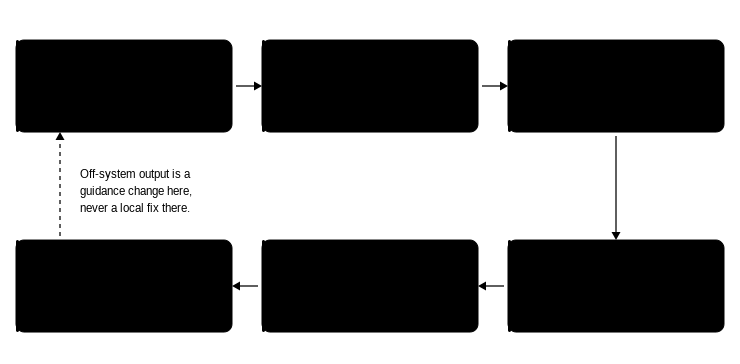
The whole path
1. Authored. A component's rules live in its own folder —
guidance.json, the doc comment above the component, the Do/Don't stories —
so guidance and code are reviewed in the same diff. Colour lives in
packages/tokens. Prose lives in docs/. Figma is reconciled to all three.
2. Built. npm run build:llms reads those sources once and writes two
shapes of the same thing: five llms*.txt files for an agent that reads, and
catalogue.json for one that queries. One run, so they cannot disagree.
3. Published. npm run build:site puts the docs, Storybook, the five text
files and the MCP endpoint on one deployment.
4. Consulted. Either by asking the server, or by reading
node_modules/@ir/ui/src — the package ships source, including every
guidance.json. Which one depends on where the agent is sitting; see Server
or source below.
5. Gated. @ir/eslint-config fails the build on a raw hex, a restyled
component, or a page with no width. This is the step that decides what
actually lands, because an agent that read nothing is caught here too.
6. Reviewed. A human reads the diff. If something off-system still got
through, the fix goes back to step 1 — the component's guidance.json — not
into the product repo. A local fix is a rule that exists in one codebase and
nowhere else, which is how a design system stops being one.
The server
One line of config, and the agent can ask Picasso questions:
https://ir-picasso.vercel.app/api/mcpRead-only, no key, no sign-in. The same endpoint works from anything that speaks MCP.
Claude Code — in the repo you are working in:
claude mcp add --transport http picasso https://ir-picasso.vercel.app/api/mcpCursor — .cursor/mcp.json:
{
  "mcpServers": {
    "picasso": { "url": "https://ir-picasso.vercel.app/api/mcp" }
  }
}
VS Code / Copilot — .vscode/mcp.json:
{
  "servers": {
    "picasso": { "type": "http", "url": "https://ir-picasso.vercel.app/api/mcp" }
  }
}
What it can ask
| Tool | Answers |
|---|---|
search_picasso | "is there a component for this?" — ranked matches across components, pages and tokens, each with a URL |
get_component | the import, every prop and its type, the variants and defaults, the pitfalls the source warns about, the do/don't pairs, the accessibility rules |
get_tokens | the resolved colour table — every token, its utility, and the hex it lands on in light and dark |
get_doc | a documentation page in full, including AGENTS.md |
get_component takes a name, a slug or an export, so TableCol finds the
table. get_tokens takes a family (bg, fg, border, status, chart) or
a substring, because the whole table is 137 rows and an agent rarely needs all
of them.
Server or source
@ir/ui ships source, not a bundle: every component .tsx, every
guidance.json, every story is in node_modules/@ir/ui/src. So an agent in a
product repo can read the design system off local disk, and that is often the
better answer — it is the implementation rather than a summary, it is the
version actually installed rather than a deployment, and it costs no network
hop.
Reach for the server when:
| There is no repo | A question asked in a chat, a design tool, or a browser agent. One URL, no install, no npm auth. |
| A colour is involved | On disk, tokens.css is var() chains across :root, .dark and each data-brand scope. An agent has to resolve them itself and gets it wrong. get_tokens returns the hex, already resolved for both themes. |
| The component is not known yet | "Is there something for this?" is a ranked search over 60 written summaries. A grep over node_modules finds the word, not the right component. |
And one that is not about capability at all: a tool in the tool list prompts
the lookup. Files in node_modules do not advertise themselves, and the
common failure is not an agent reading the wrong source — it is an agent
reading nothing.
If your repo has the package, say so in its own AGENTS.md. Pointing at
node_modules/@ir/ui/src/components/<name>/guidance.json gets most of this for
free.
Why not just the text files
llms-full.txt is most of a megabyte: an agent that loads it has spent its
context before writing a line. The server is a variable cost — twenty lines
about the component in hand. Both come out of the same catalogue in the same
run, so neither can tell you something the other denies.
The files
For a tool that cannot speak MCP, or for a one-off paste into a prompt:
| File | Contents |
|---|---|
/llms.txt | index — one line per page |
/llms-components.txt | every component: API, pitfalls, do/don't |
/llms-tokens.txt | the resolved token table |
/llms-foundations.txt | foundations and content rules |
/llms-full.txt | all of it |
Any docs page also returns its own markdown — add .md to the URL.
What still belongs in your repo
The server tells an agent what Picasso has. It does not tell it what your
product has decided. Keep the project's own AGENTS.md or CLAUDE.md saying:
- which Picasso version the product is on
- that raw hex, raw radius and raw spacing are lint errors here, not matters of taste
- where the product's own patterns live
And install @ir/eslint-config, because a rule an agent can read is a rule an
agent can also forget. See For engineers.